 Claude
 Claude Code
 ChatGPT
 Grok Bot
 Muse
 Hermes
 OpenClaw
 Join with Google

Codex + Sightkick: SEO and GEO for OpenAI's coding agent
Updated
Codex, OpenAI's coding agent, connects to Sightkick's MCP server with two commands: codex mcp add and codex mcp login. Codex then reads your site's AI visibility, Search Console data and keywords, and writes, scores and schedules pages. In CI or Codex Cloud it uses Sightkick's CLI on an API key.
Sightkick makes this page. The setup below was run on 5 November 2026 against sightkick.so's own workspace.
Key takeaways
- Two commands. codex mcp add sightkick --url https://app.sightkick.so/mcp, then codex mcp login sightkick. No API key on your own machine.
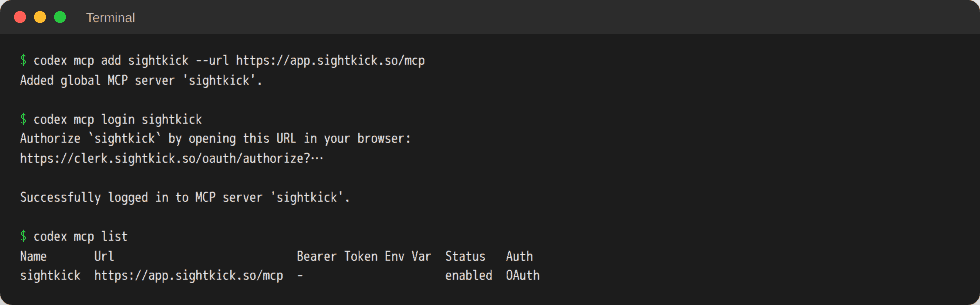
- Tested. On 5 November 2026 the login printed "Successfully logged in", and codex mcp list showed the server enabled with OAuth.
- Headless too. In CI and Codex Cloud, Codex runs Sightkick's CLI on a key, with the same 37 tools.
- Your gates. Sightkick asks for no confirm. Codex's approval settings decide when it stops to ask you.
How do you connect Codex to Sightkick?
Run two lines in your terminal: the first adds Sightkick's server, the second signs in. It takes about a minute, and the same lines are in Sightkick's Codex setup.
codex mcp add sightkick --url https://app.sightkick.so/mcp
codex mcp login sightkick
The first line adds the server and opens the sign-in. If it doesn't, the second line does. In the browser, sign in to Sightkick and pick the workspace for your site. Codex connects at the start of its next task, and codex mcp list shows the server with OAuth.
The same server in ~/.codex/config.toml:
[mcp_servers.sightkick]
url = "https://app.sightkick.so/mcp"
Per OpenAI's MCP docs for Codex, the Codex CLI, the IDE extension and the ChatGPT desktop app share this file, so the server is there in all three. To check it works, start a task and ask Codex to call get_workspace. It returns the workspace, the plan's amounts and what's left, Sightkick's jobs, what setup still lacks and what's new since the last session.
No Sightkick account yet? Ask Codex to "set up Sightkick for my site by following https://sightkick.so/llms.txt". It sends Sightkick a draft with your site, brand, competitors and buyer questions. Nothing is charged and nothing runs. It gives you a sign-up link, then waits in the background while you start the 7-day trial (a card, nothing charged for 7 days) and connects with the key it collects. Or start with the free AI visibility report, no card.
What can Codex do with Sightkick?
Codex can report on AI visibility, plan and write pages, and check your brand's own search, from a repo or a pipeline. Four jobs, each with a prompt and what came back on sightkick.so, Sightkick's own site.
A visibility report on every scheduled run
Run Sightkick's CLI as its own CI step and pipe the JSON into codex exec. Codex reads piped input as context for the prompt.
npx -y sightkick get-visibility summary \
  | codex exec "Summarize this AI visibility report for the team in six lines. Lead with branded against unbranded."
On sightkick.so, Sightkick's own site, for the 14 days to 2026-11-04: 100 tracked prompts, asked daily in ChatGPT, Gemini, Google AI Overviews and Google AI Mode, made 5,960 answers. On the 15 branded prompts, AI named Sightkick in 33 of 40 answers (82.5%). On the 85 unbranded prompts, it named Sightkick in 23 of 5,960 answers (0.4%). The second number is the one to move.
A new page for a rising keyword
Research "google search console mcp" with Sightkick and read its Google
results with check_web. If it fits us, write the page in this repo,
create it in Sightkick with update_page, score it with score_page and
fix what the checklist flags. Leave it unscheduled.
On sightkick.so, Sightkick's own site, on 2026-11-04 (US): "google search console mcp" gets 480 searches a month at difficulty 17, up from 110 a year ago to 1,000 last month. Google shows a LinkedIn how-to post, ekamoira.com/tools/gsc and mcpmarket.com listings. The AI Overview names Composio, SEOcrawl AI and Advanced GSC as hosted ways in. score_page grades the draft on four pillars (answers the search, says something new, can be trusted, easy to quote) and lists the fixes.
Your brand's own search
Use Sightkick's get_search_console with the query view, filtered to our
brand name. Show impressions, clicks and average position for 28 days.
Then check the home page's title and meta tags in this repo.
On sightkick.so, Sightkick's own site, from 2026-10-07 to 2026-11-03: the query "sightkick" had 173 impressions, 1 click and an average position of 17.9. The query view asks Google live, up to 1,000 rows. A brand that sits at position 17.9 for its own name is a job for the repo, which is where Codex already works.
Plan the page types AI cites
Which page types do AI answers cite most for our tracked prompts?
Propose three pages for next month from Sightkick's keyword topics,
create each with update_page, and leave them in Unscheduled for review.
On sightkick.so, Sightkick's own site, over 14 days: product pages drew 3,076 citations, listicles 1,292, guides 412, discussions 165 and videos 72. Sightkick publishes blog posts and comparison, alternatives, integration and use-case pages, so the plan can follow what gets cited.
How does Codex use Sightkick without a browser?
Without a browser, Codex uses an API key with Sightkick's CLI or HTTP API instead of the MCP sign-in. That works in CI, a cron job or a Codex Cloud task, with the same tools as the MCP server. Make the key in Sightkick under Settings → Agents, then New key, and tick only what the job needs: read always, then write, spend, publish or send. Keep it in SIGHTKICK_API_KEY, out of code, commits and anything you share.
- CI. Store the key as a secret and run the CLI as its own step, as in the first job above. OpenAI documents API-key sign-in for codex exec in CI/CD jobs.
- Inside a local Codex session. The default workspace-write sandbox keeps network access off for commands. Running npx -y sightkick there needs your approval, or network_access = true under [sandbox_workspace_write] in config.toml.
- Codex Cloud. Add SIGHTKICK_API_KEY under the environment's Environment variables. If public internet access is off, allow api.sightkick.so under Additional allowed domains, and turn on the Package managers preset so npx reaches npm.
Is it safe to give Codex access to Sightkick?
Yes, with the gates you set in Codex. Sightkick gives Codex what it gives you: every report, every page, the calendar, publishing and outreach. It keeps four things for a person: signing in, entering the first card, ending a trial early (Start my plan now) and deciding who gets access. One OAuth grant covers one workspace. Every change Codex makes appears in Sightkick's activity feed, attributed to it, or to the key's name on the CLI.
Sightkick asks for no confirmation. The gates are in Codex:
- Codex always asks before an MCP tool call that advertises a destructive annotation, per OpenAI's approvals docs. Sightkick marks actions that delete something, take a page down or send an email as destructive.
- default_tools_approval_mode = "writes" makes Codex ask before any Sightkick tool not marked read-only. "prompt" asks for every tool.
- enabled_tools limits the server to the tools you list. This makes a Codex that can only read:
[mcp_servers.sightkick]
url = "https://app.sightkick.so/mcp"
enabled_tools = ["get_workspace", "get_guidance", "get_visibility", "get_search_console", "get_keywords", "get_pages"]
On a key, untick publish and send, and the CLI can't do either. On Sightkick's side, put its jobs on Manual, since job settings govern only what Sightkick does by itself, and let Codex create pages without a day: they wait in Unscheduled. Every agent edit to a live page is kept and can be undone. An edit made on an old copy of a live page is refused.
What if Codex can't reach Sightkick?
Most problems are a task that started before the server was added, a sign-in that didn't open, or Codex's sandbox blocking the network. Each fix is below.
Sightkick's tools aren't in the task
Codex connects at the start of its next task, so start a new one. codex mcp list should show sightkick with OAuth.
The sign-in didn't open
Run codex mcp login sightkick.
Every tool says the connection isn't tied to a Sightkick workspace
The new account's sign-in finished before its workspace existed. Finish setting up at app.sightkick.so/start (sign in, confirm the site, start the trial or the plan). Then run the sign-in again, or remove the server and add it back.
No browser for the sign-in
On a server, in a scheduled job or on a headless box, use an API key from Settings → Agents, sent as Authorization: Bearer <key>, with the CLI or the HTTP API.
npx -y sightkick fails inside Codex
If it can't reach the network, that's Codex's sandbox: approve the command, or turn on network access for workspace-write. In Codex Cloud, check the environment's allowed domains. If it exits with 3, the key is missing, wrong or lacks a permission.
Every write fails with no_plan
No plan is running. Reads still work. The owner starts the plan under Settings → Plan.
What is Codex?
Codex is OpenAI's coding agent. OpenAI introduced it in May 2025 as a research preview of a cloud-based software engineering agent. The Codex CLI is open source under Apache-2.0: OpenAI describes it as "a coding agent from OpenAI that runs locally on your computer."
Codex runs in four places: the Codex CLI in your terminal, the IDE extension (VS Code, Cursor and Windsurf, with Xcode and JetBrains through their own integrations), Codex in the ChatGPT desktop app, and Codex Cloud, which runs tasks in cloud environments, started from ChatGPT on the web, mobile or desktop. codex exec runs it from scripts and CI. OpenAI includes Codex in ChatGPT's Free, Go, Plus, Pro, Business, Edu and Enterprise plans. With an OpenAI API key it runs in the CLI, SDK and IDE extension, without the cloud features.
Codex is not ChatGPT's chat, though they now share an app. Codex's local clients connect to MCP servers directly and share config.toml. ChatGPT reaches Sightkick as a connector instead (see ChatGPT + Sightkick).
FAQ
What does it cost?
Sightkick Standard is $39 a month ($31 billed yearly): Codex writes the pages and Sightkick does the rest. Pro is $99 a month ($79 billed yearly) and adds 30 articles a month that Sightkick writes and publishes. MCP, CLI and API are on both. The 7-day free trial takes a card and charges nothing for 7 days. Codex itself comes with your ChatGPT plan or your API key.
Do I need an API key?
Not on your own machine: codex mcp add signs in with OAuth. In CI, a cron job or Codex Cloud, yes: a Sightkick key from Settings → Agents, with the CLI or the HTTP API.
Will Codex publish without asking?
Sightkick never asks for a confirm. Whether Codex asks is your Codex approval setting, so keep "writes" on the server if you want a stop before every change. Pages Codex creates without a day don't go anywhere until someone schedules them.
Can it run on a schedule?
Sightkick runs on its own: prompts asked daily, Search Console synced daily, keyword research weekly, pages published on their day. For Codex on a schedule, put codex exec in a scheduled CI job with the CLI, as above.
Do I need a Codex SEO skill?
Not for Sightkick. Codex reads an MCP server's instructions as guidance for its tools, and Sightkick's playbook ships there and in get_guidance.
Does Sightkick track what ChatGPT says about me?
Yes, if ChatGPT is one of your AI models. Sightkick tracks ChatGPT, Gemini, Google AI Overviews and Google AI Mode: 3 included, a 4th as an add-on.
How does Codex compare with other agents on Sightkick?
Codex and Claude Code both run headless and connect by command. ChatGPT and Claude connect as chat-app connectors you add yourself.
| Agent | Where you talk to it | How it connects to Sightkick | Sign-in | Runs headless |
|---|---|---|---|---|
| Codex | CLI, IDE extension, ChatGPT desktop app, Codex Cloud | codex mcp add or config.toml; the CLI on a key in CI and Cloud | OAuth via codex mcp login, or an API key | Yes: codex exec |
| Claude Code | Terminal, IDEs, Claude desktop app, web | claude mcp add | OAuth, from /mcp | Yes: claude -p |
| ChatGPT | Web, desktop, mobile | Custom MCP server from Plugins, added by you (web) | OAuth in the browser | No: a chat app |
| Claude | claude.ai, desktop and mobile apps | Custom connector, added by you | OAuth in the browser | No: a chat app |
Sources: OpenAI Codex MCP docs, Sightkick's connect guide, read 7 November 2026.
Next
- Sightkick's MCP server: the endpoint, the tools and the limits.
- OpenClaw + Sightkick and Hermes Agent + Sightkick: the open-source agents you run yourself.
- Pricing: Standard for when Codex writes, Pro for when Sightkick writes too.
- Free AI visibility report: about 30 buyer questions, no card.
- Claude Code + Sightkick: the same server from Anthropic's coding agent.
- ChatGPT + Sightkick: Sightkick inside ChatGPT's chat.