 Claude Code
 Codex
 Cursor
 Claude
 ChatGPT
 Grok Bot
 Muse
 Hermes
 OpenClaw
 WordPress
 Shopify
 Framer
 Webhook
 Join with Google

Gemini CLI + Sightkick: an SEO and GEO MCP server
Give Gemini CLI the SEO and GEO toolkit for AI agents: one gemini mcp add line and /mcp auth, then its agent researches keywords, reads Search Console and AI answers, and writes and schedules pages, under your own approval rules.

By Fabio BergmannUpdated 12 min read
On this page
Sightkick is the SEO and GEO toolkit for AI agents, and Gemini CLI takes it as an MCP server with one terminal command and one sign-in: run gemini mcp add with Sightkick's address, https://app.sightkick.so/mcp, then type /mcp auth sightkick inside Gemini CLI and approve in the browser. Gemini CLI's agent then has 37 tools as its hands: it reads your site's AI visibility, Search Console data and keywords, and writes, scores and schedules pages, so the site can win new customers from Google and AI search.
We make Sightkick, the SEO and GEO toolkit for AI agents. On 11 November 2026 the setup below was run against Sightkick's production server with Gemini CLI 0.68.0: the sign-in finished and /mcp list showed sightkick Ready with 37 tools. On 16 November we ran the add line again on 0.68.0, still the newest release: gemini mcp list showed sightkick Connected, and the server listed the same 37 tools. The screenshots are from the first run, with the test account's email replaced.
Key takeaways
- Two lines. gemini mcp add --scope user --transport http sightkick https://app.sightkick.so/mcp in the shell, then /mcp auth sightkick inside Gemini CLI.
- Trust the folder. Gemini CLI 0.68.0 loads no MCP server in a folder you haven't trusted, user-level ones included.
- Gemini CLI is the gate. Sightkick asks for no confirmation. Gemini CLI asks before each tool call by default, and a policy file lets the reads run alone.
- A key for headless runs. gemini -p in CI sends a Sightkick API key instead of the browser sign-in.
- Check your access first. Gemini CLI now serves Gemini Code Assist organizations. Free and Google AI Pro or Ultra accounts moved to Antigravity CLI on 18 June 2026.
What do AI answers say about Gemini as an SEO agent?
AI answers say Gemini can help with SEO but can't act on your site by itself. In 10 of 40 answers to "Can I use Gemini as an SEO agent for my website?", the AI model said Gemini can't log into your CMS or publish changes on its own. Gemini said so about itself in 5 of its own 10 answers.
Sightkick asks that question every day in ChatGPT, Gemini, Google AI Overviews and Google AI Mode, in sightkick.so's own workspace. What the 40 answers named, 4–13 November 2026:
- Data tools. Google Search Console in 26 answers, Semrush in 21, Ahrefs in 19, Screaming Frog in 13.
- Ways to connect. An API in 13, n8n in 8 (7 of them Google AI Overviews), Gemini Enterprise in 6, MCP in 2 (both Google AI Mode).
- Gemini CLI in none, and Sightkick in none.
So the answers point at the gap an MCP server fills: Gemini with live data and a way to act, not a chat window you paste exports into. Gemini CLI takes MCP servers, and per its MCP docs it signs in to a remote one with OAuth.
Method: Sightkick's daily runs of one tracked prompt, 10 answers each from ChatGPT, Gemini, Google AI Overviews and Google AI Mode, 4–13 November 2026. A tool counts when the answer's text names it.
How do you add Sightkick to Gemini CLI?
Adding Sightkick to Gemini CLI takes one shell command, one slash command and a browser sign-in. About a minute, and the same lines are in Sightkick's setup guide for agents.
- Add the server. In your terminal:
Gemini CLI answers that the server was added to user settings, which is ~/.gemini/settings.json. Keep --scope user. Without it, Gemini CLI's default scope is the project, so the server goes into the current folder's .gemini/settings.json only.
gemini mcp add --scope user --transport http sightkick https://app.sightkick.so/mcpThe add line on 11 November 2026, Gemini CLI 0.68.0. - Start the sign-in. Open Gemini CLI with gemini, then type:
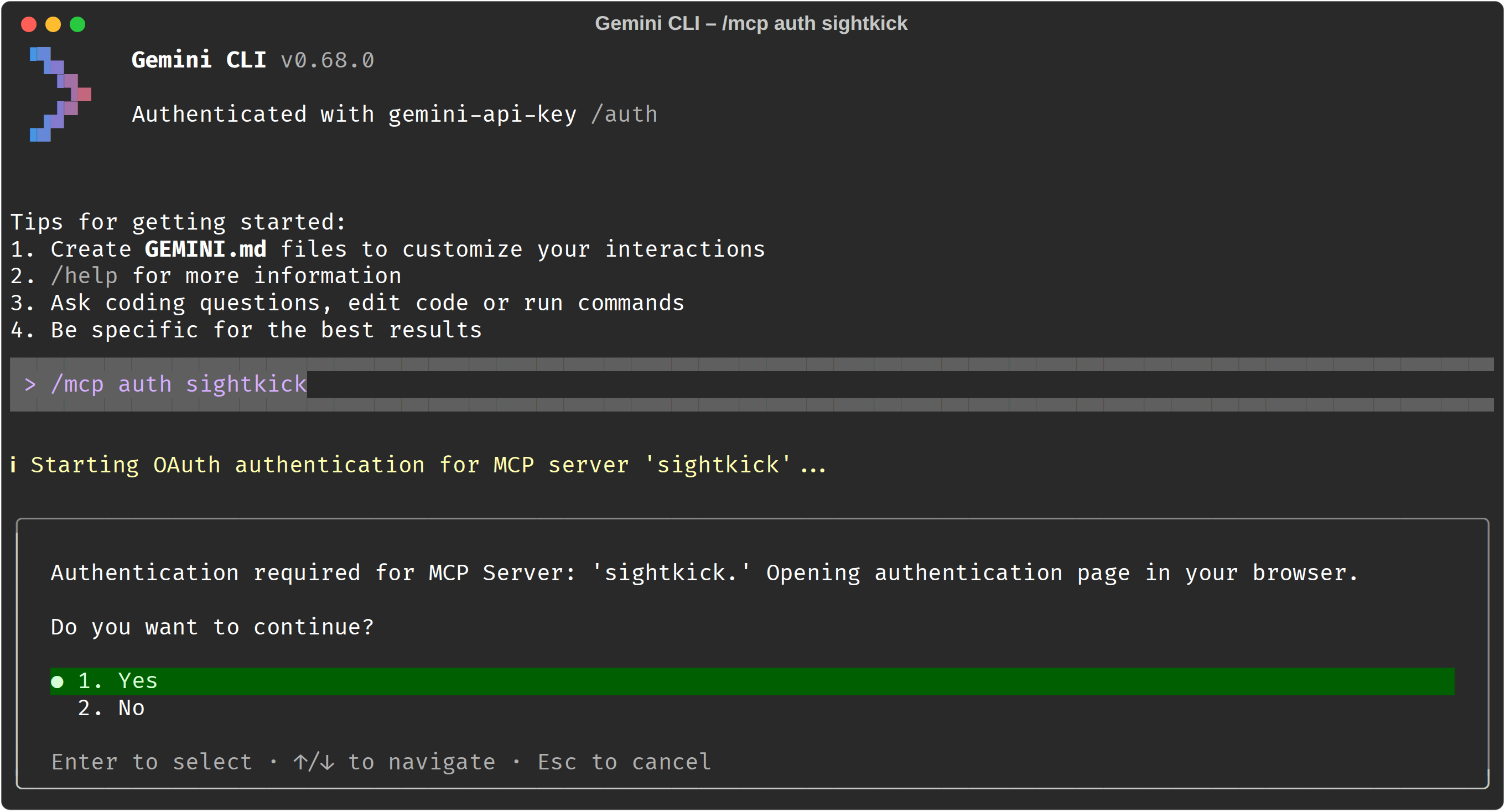
Gemini CLI asks whether to open the authentication page in your browser. Answer Yes. If no browser opens, it prints the sign-in link to copy.
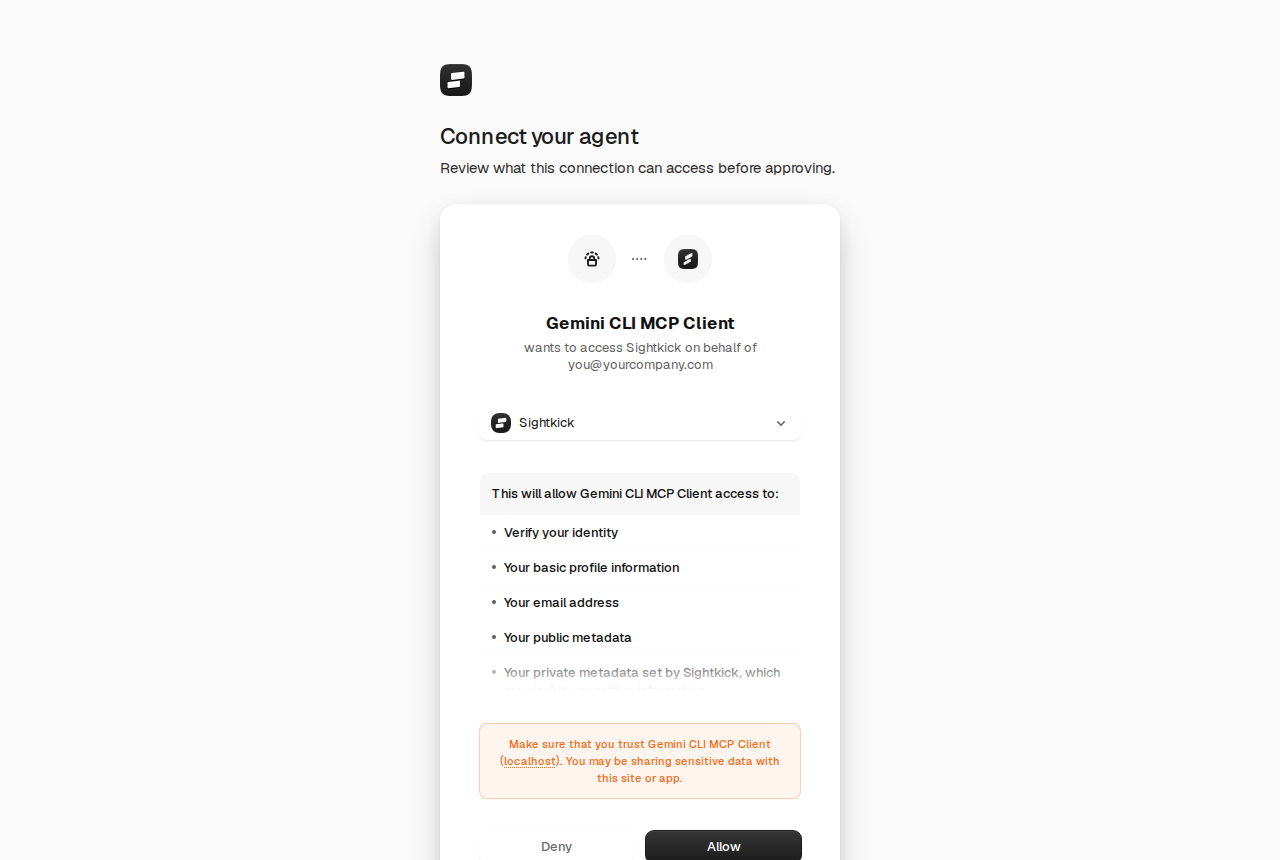
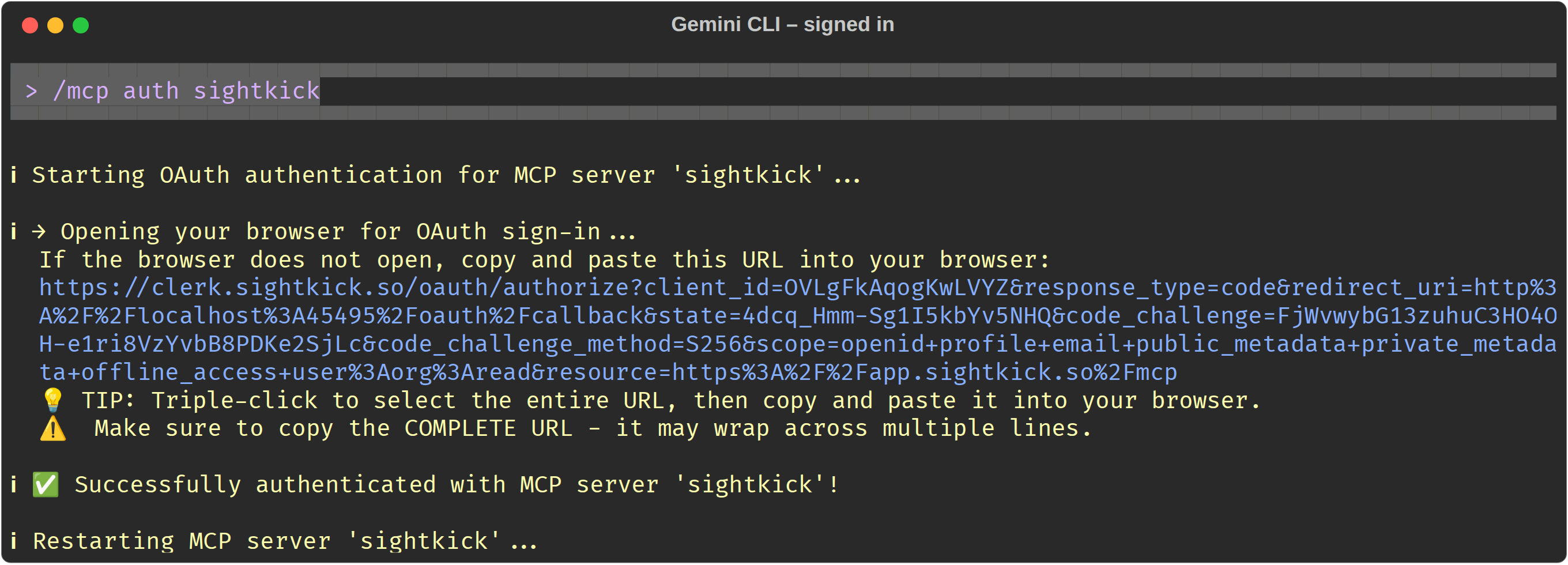
/mcp auth sightkick/mcp auth sightkick asks before it opens the browser. - Allow the connection. Sign in to Sightkick in the browser and pick the workspace for your site. Sightkick's consent screen names Gemini CLI MCP Client as the app asking for access. Choose Allow, and Gemini CLI reports that it authenticated and restarts the server.
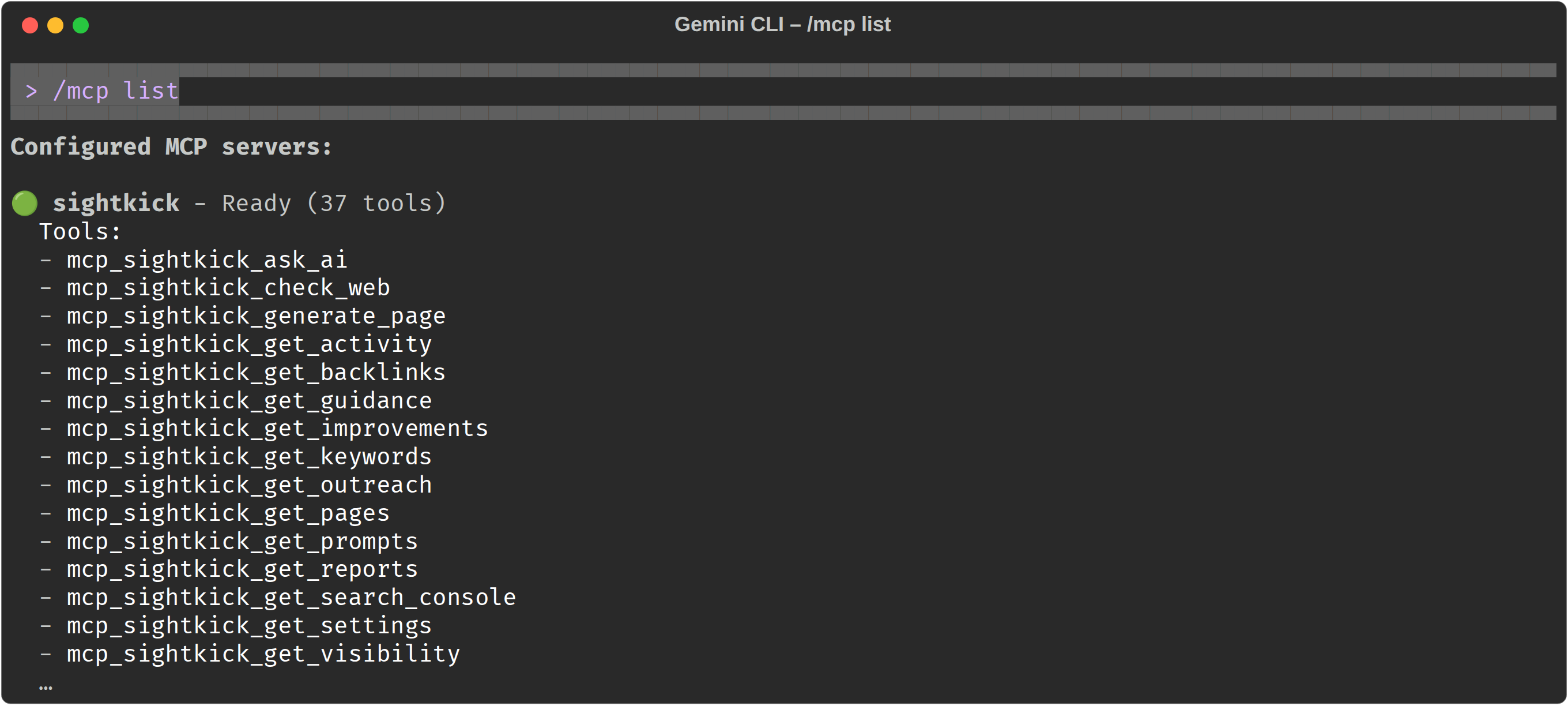
Sightkick's consent screen for Gemini CLI. The test account's email is replaced with a placeholder. Back in Gemini CLI after Allow: authenticated, and the server restarts with the new sign-in. - Check it. Type /mcp list. Sightkick shows as Ready with its tools, each named mcp_sightkick_ and the tool, such as mcp_sightkick_get_visibility. Then ask Gemini to call get_workspace: it answers with the workspace, what the plan includes and what's left this month, Sightkick's jobs and the setup steps still missing. If sightkick shows as Disabled, the folder isn't trusted: Gemini CLI 0.68.0 has folder trust on by default and loads no MCP server there, not even one from user settings. Run /permissions trust in that folder.
/mcp list after the sign-in: sightkick Ready with 37 tools.

Run /mcp auth right after the add, even though Sightkick already shows as Ready. Sightkick lists its tools before anyone signs in, so Ready alone doesn't mean the sign-in happened. Per Gemini CLI's MCP docs, the tokens are stored in ~/.gemini/mcp-oauth-tokens.json and refreshed when they expire, and /mcp auth sightkick signs in again if they lapse.
No Sightkick account yet?
Ask Gemini CLI to "set up Sightkick for my site by following https://sightkick.so/llms.txt". The agent drafts your site, brand, competitors and buyer questions for Sightkick, charges nothing and runs nothing, and gives you a sign-up link for the 7-day trial (a card, nothing charged for 7 days). Or first see what AI search says about you – free.
Who is the Gemini CLI setup for?
The Gemini CLI setup is for teams that already run Gemini CLI on Google Cloud and want its agent to do SEO and GEO work beside their code. Google now aims Gemini CLI at organizations with Gemini Code Assist Standard or Enterprise, Code Assist for GitHub, or a paid Gemini API or Vertex AI key.
That changed this year. Gemini CLI's GitHub README, read 13 November 2026, says free individual access and Google AI Pro and Ultra plans moved to Antigravity CLI on 18 June 2026. If you sign in to Gemini CLI with a personal Google account, check that note first. We haven't run Sightkick in Antigravity CLI.
What can Gemini CLI do with Sightkick?
With Sightkick, Gemini CLI has the hands for all of SEO and GEO: it can do what you can do in the app, from keyword research and Search Console to writing, scheduling and publishing pages and pitching the pages AI search cites. Sightkick keeps four things for a person: signing in, entering the first card, ending a trial early (Start my plan now) and deciding who gets access. Three prompts to start with:
1. Where AI answers leave you out
Call Sightkick's get_visibility with view summary for 14 days.
Split branded from unbranded prompts and show the share of answers
that name us in each. Then list the 5 unbranded prompts we lose most,
with the brands the AI models named instead.
This is the same tracking as the data above, for your own buyer questions. The unbranded share is the number new pages can move.
2. Searches that sit just off page one
Use get_search_console view detail to list our searches at positions
8 to 20 over 28 days. For each one this repo can affect, find the page
in the code, rewrite its title and first paragraph to answer the search,
and show me the diff before you change anything.
Gemini CLI already reads your repo, so a fix that lives in the site's code stays in one session. It needs Search Console connected in Sightkick, as on the Google Search Console integration.
3. One job end to end: from a keyword to a scored draft
Run research_keywords from list on [keyword 1], [keyword 2], [keyword 3].
Pick the one with the most volume and the right intent. Run get_pages
check_topic so we don't write a second page on a question we already
answer. Then create the page with update_page, score it with score_page
and leave it unscheduled for me.
A page without a date waits in Unscheduled until someone gives it one, so nothing goes live from this prompt.
What does Gemini CLI send to Sightkick, and what doesn't it?
Gemini CLI sends Sightkick only the tool calls its agent makes, with their arguments. Sightkick answers with your workspace's data. Your files, your chat with Gemini and your Google account stay with Gemini CLI unless the agent puts something into a call, such as a page body it wrote.
- Sightkick's playbook rides along. Gemini CLI appends an MCP server's instructions to its system instructions, per its MCP docs, so Sightkick's playbook reaches the agent without a GEMINI.md entry.
- One workspace per sign-in. The grant covers the Sightkick workspace you picked. Other workspaces stay out of reach.
- A record. Sightkick's activity feed lists every change against the client that made it. Edits to live pages can be undone.
- Not checked. Sightkick checks AI answers every day in 3 of ChatGPT, Gemini, Google AI Overviews and Google AI Mode, the 4th as an add-on, and Perplexity and Copilot only when your agent asks. It doesn't check Claude, and it doesn't read what Gemini CLI says to you.
How do you control what Gemini CLI does in Sightkick?
You control it in Gemini CLI, because Sightkick never asks for a confirm. Gemini CLI asks before every MCP tool call by default, and each prompt offers to allow once, always allow the tool or always allow the server.
To let the reads run without a prompt and keep every change behind a click, add a user policy. Per Gemini CLI's policy engine docs, a rule names the server with mcpName and the tools by their plain names. Save this as ~/.gemini/policies/sightkick.toml:
[[rule]]
mcpName = "sightkick"
toolName = ["get_workspace", "get_visibility", "get_search_console", "get_keywords", "get_pages", "get_prompts", "get_guidance"]
decision = "allow"
priority = 200- Policies go in your home folder. Gemini CLI ignores policy files inside a project's .gemini/policies folder.
- Leave trust off. --trust on the add line, or "trust": true in settings, skips every confirmation for the server, publishing and email included.
- Hide tools you never want. A deny rule removes a tool from the model's view entirely. --exclude-tools on the add line does the same per server.
- Trusted folders. Folder trust is on by default in Gemini CLI 0.68.0: in a folder you haven't trusted, it connects to no MCP server at all, user-level ones included. Trust a folder with /permissions trust.
How does Gemini CLI use Sightkick without a browser?
Without a browser, Gemini CLI sends a Sightkick API key on every request instead of the OAuth sign-in. Gemini CLI's OAuth needs a local browser and a callback on localhost, so it can't sign in on a server with no browser, in CI or over SSH without X11 forwarding.
Make the key in Sightkick under Settings → Agents, then New key, and tick only what the job needs. Keep it in SIGHTKICK_API_KEY and add the header in single quotes, so the settings file stores the variable's name and Gemini CLI reads the key from the environment when it starts:
gemini mcp add --scope user --transport http \
  -H 'Authorization: Bearer $SIGHTKICK_API_KEY' \
  sightkick https://app.sightkick.so/mcp
In headless runs (gemini -p), a call that would ask you is refused instead, per the policy engine docs. Allow the tools the job needs in your policy file, and use --approval-mode=yolo only where you accept every action. Outside Gemini CLI, the same key runs Sightkick's CLI (npx -y sightkick) and its HTTP API, with the same tools.
What doesn't the Gemini CLI setup do?
The setup gives Gemini CLI Sightkick's tools. It doesn't change what Gemini CLI is or when it runs.
- It doesn't run by itself. Gemini CLI works when you or a script start it. Between sessions, Sightkick publishes the pages on the calendar, runs the daily AI checks and syncs Search Console.
- It isn't tested in Antigravity CLI. Our runs covered Gemini CLI 0.68.0 only.
- It doesn't check Claude. Sightkick checks ChatGPT, Gemini, Google AI Overviews and Google AI Mode, and Perplexity and Copilot on demand.
- It doesn't reach your site without a connection. Pages go out through WordPress, Shopify, Framer or a webhook connected in Sightkick.
What if Gemini CLI can't reach Sightkick?
When Gemini CLI can't reach Sightkick, the cause is usually a sign-in that never ran, a server saved to the wrong settings file, or a new account without a workspace.
Sightkick shows Ready but every call fails
The sign-in hasn't happened. Run /mcp auth sightkick and approve in the browser.
Sightkick isn't in /mcp list
The server went into another folder's project settings. Remove it with gemini mcp remove sightkick and add it again with --scope user.
gemini mcp list shows sightkick as Disabled
The folder isn't trusted, and Gemini CLI loads no MCP server there. Run /permissions trust inside Gemini CLI in that folder.
The sign-in page never comes back to Gemini CLI
The browser must reach localhost on the machine running Gemini CLI. Over SSH or in a container it can't, so use an API key there.
Every tool says the connection isn't tied to a Sightkick workspace
The account's sign-in finished before its workspace existed. Finish setup at app.sightkick.so/start (sign in, confirm the site, start the trial or the plan), then run /mcp auth sightkick again.
Writes fail with no_plan
The workspace has no running plan. Reads still work, and the owner starts the plan under Settings → Plan.
How does Gemini CLI compare with other agents on Sightkick?
Gemini CLI signs in with its own slash command, /mcp auth, right after the add. Claude Code asks at the first tool call, Codex has a login command, and Cursor signs in from its MCP settings.
| Agent | How you add Sightkick | Sign-in | How you check it |
|---|---|---|---|
| Gemini CLI | gemini mcp add --scope user --transport http | /mcp auth sightkick, then Allow in the browser | /mcp list shows sightkick Ready |
| Claude Code | claude mcp add --transport http | At the first tool call, from /mcp | /mcp lists sightkick |
| Codex | codex mcp add sightkick --url | Opens on add, or codex mcp login sightkick | codex mcp list shows OAuth |
| Cursor | One entry in mcp.json | Sightkick's row in Cursor's MCP settings | Tools show as enabled |
Sources, read 13 November 2026: Sightkick's setup guide for agents, Gemini CLI MCP docs, Codex + Sightkick.
Frequently asked questions
Does Gemini have MCP support?
Gemini CLI does. Its MCP docs cover local servers over stdio and remote servers over SSE or streamable HTTP, with OAuth sign-in for remote ones. Sightkick is a remote server over streamable HTTP.
What does Sightkick cost with Gemini CLI?
Sightkick is $29 a month (limited-time launch price): your agent writes the pages and Sightkick does the rest. Pages written and published by Sightkick are an add-on, from $49 a month for 30. The MCP server is included, and the 7-day trial takes a card, charges nothing for 7 days and includes 3 pages written by Sightkick. Gemini CLI's own access is separate. See pricing.
Do I need an API key for Sightkick in Gemini CLI?
Not on your own machine: Sightkick's sign-in is OAuth through /mcp auth. A key is for a Gemini CLI with nobody to approve the browser sign-in, such as gemini -p in CI.
Can Gemini CLI publish pages without asking?
Only if your Gemini CLI settings let it. Sightkick doesn't confirm, so keep the server untrusted and allow only reads in your policy file if every change should wait for you. A ready page with a date goes live on that date.
Do I need a GEMINI.md entry for Sightkick?
No. Sightkick's playbook reaches Gemini CLI in the server's instructions and through get_guidance. A GEMINI.md line can still pin your own rules, such as "never publish without asking me".
Next
- Sightkick's MCP server: the address, the tools and the setup for each client.
- Claude Code + Sightkick and Codex + Sightkick: the same server from two other terminal agents.
- Google Search Console + Sightkick: the data behind the second prompt.
- Free AI visibility checker: what AI search says about your brand today, 5 questions, no card.
Written by
Fabio Bergmann · Founder of Sightkick
Fabio works on SEO and GEO: getting brands ranked on Google and recommended by AI. He builds the tools that let your AI agent do that work every day.