 Join with Google
AI Visibility Report: How to Create One (Step-by-Step)

Fabio Bergmann
More than 27,000 brands have used Amplitude’s free AI Visibility tool. To create an AI visibility report, define your metrics, map each to a source, test a fixed buyer-prompt set across AI platforms, and compile monthly results with citations, competitor comparisons, business outcomes, and assigned actions.
What you need before building an AI visibility report
An AI visibility report starts with source access and a documented test set. Gather Search Console, Bing Webmaster Tools, your analytics reporting, and buyer questions. Choose a tracker or manual collection process. Record the brand names, competitors, platforms, and reporting period before collecting results.
- Google Search Console: Google’s Generative AI performance report became available to all websites worldwide on August 31, 2026.
- Bing Webmaster Tools: Microsoft’s AI Performance report launched in public preview in February 2026. Record that launch status in your source notes.
- Business reporting: Prepare your existing traffic, lead, and revenue measures. Keep attributable referral activity separate from answer visibility.
- Prompt register: Document buyer questions, intent, target market, and competitors. Include category discovery, product comparisons, and use-case questions.
- Collection method: Choose manual answer capture or a tracker. Check platform coverage and prompt controls before purchasing.
Store prompt definitions, raw answers, source exports, and the finished report separately. Preserve the evidence. A screenshot without the prompt, platform, and capture date cannot support a clean period-to-period comparison.
Step 1: Define what you're measuring and why
An AI visibility report measures brand appearances in generated answers and changes over time, rather than only keyword rankings. Define the decision first: which recommendations are you missing, which competitors appear instead, or which descriptions need correction? Choose primary metrics before collection so the report answers that decision.
- Separate mentions from citations. A mention records your brand appearing in an answer. A citation records a source attributed or linked by that answer. Store them separately.
- Define visibility percentage. Calculate answers mentioning the brand divided by eligible answers collected. Label this as your report’s calculation, not a universal platform metric.
- Keep sentiment inspectable. Record favorable, neutral, or negative wording alongside the answer excerpt. Retain any tool-supplied scoring definition.
- Use the correct Citation Share denominator. Microsoft defines Citation Share as your site’s citations divided by citations across all sites for the same grounding query, expressed as a percentage.
- Document competitive metrics. Ahrefs Brand Radar measures mentions, citations, impressions, and AI Share of Voice. Preserve the vendor’s definitions.
Recommendation position needs a rule. For an ordered shortlist, record the brand’s position. For an unordered discussion, mark position as unavailable. Do not turn prose order into a ranking without disclosing that interpretation.
Use visibility and competitive presence for the executive summary. Use citation activity and missing prompts for content diagnosis. Keep supporting fields available without crowding the headline view.
Step 2: Map each metric to its data source
An AI visibility report needs a source map, not a blended score with unclear inputs. Assign generative-search impressions to Search Console, citation activity to native dashboards, answer-level brand tracking to a tracking tool, and business outcomes to analytics. Keep metrics separate unless their definitions, coverage, and reporting windows match.
- Google Search Console: generative-search impressions
- Google’s report shows organic impressions from Search generative AI features over time, by page, device, and country. Use those dimensions to locate the pages and markets behind a change.
- Bing Webmaster Tools: citation diagnostics
- Microsoft’s AI Performance dashboard exposes average cited pages, grounding queries, page-level citation activity, and visibility trends over time. Inspect the query and page views behind citation movement.
- Microsoft Clarity: answer citations only
- Clarity’s Citation dashboard tracks citation activity in AI-generated answers only. It does not measure traditional search rankings, impressions, or click-through rates. Do not use it to fill those columns.
- Ahrefs Brand Radar: cross-platform answer evidence
- Brand Radar covers six platforms: AI Overviews, Gemini, Copilot, Perplexity, ChatGPT, and Google AI. It stores every response, supporting answer-level inspection alongside its brand and competitor metrics.
- Semrush My Reports: report assembly
- Semrush’s AI Visibility Toolkit provides Visibility Overview, Brand Performance, Competitor Research, and Prompt Tracking widgets in My Reports. Use them as report components, not as another independent measurement source.
- Amplitude: a free starting benchmark
- Amplitude says more than 27,000 brands have used its free tool. AI Visibility measures how often and how favorably brands appear in ChatGPT and Google AI Overview answers. Its free report shows where the brand appears, how AI describes it, and what to fix next.
Attach the traffic and conversion measures your team maintains. Label the attribution method and reporting window. An answer mention, cited URL, referral session, and lead are separate observations. Do not join them into a conversion claim without evidence.
Step 3: Run the same prompt set across each AI platform
An AI visibility report needs fixed buyer questions and separate platform records. Run the same prompt register across the AI platforms in scope. Capture complete answers, brand mentions, citation URLs, and recommendation positions. Comparable inputs and retained evidence help distinguish a measured change from a change in the test itself.
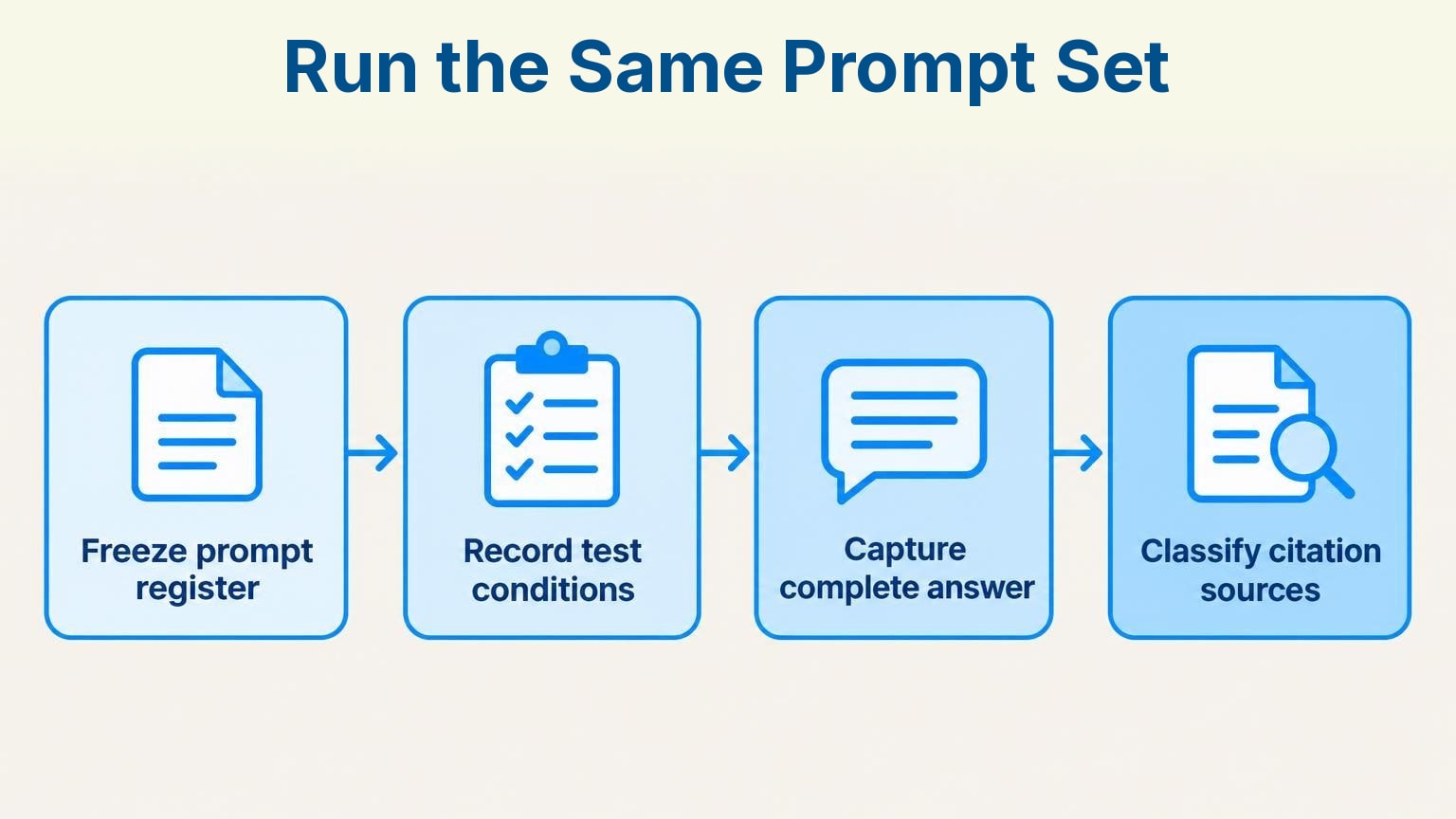
Process infographic: Run the Same Prompt Set – Freeze prompt register, Record test conditions, Capture complete answer, Classify citation sources
- Freeze the prompt register. Assign IDs. Store exact wording, intent, language, target market, and inclusion date. Version any additions or edits.
- Record test conditions. Log the platform, available model identifier, capture time, and whether the test used an existing conversation or a fresh one. Keep the procedure consistent.
- Capture the complete answer. Save responses and cited URLs, including answers where your brand is absent. Absence belongs in the denominator.
- Classify citation sources. Use a documented scheme: UGC, Editorial, Owned, and Competitor. Keep each URL beside its classification.
- Compare matching samples. Report platforms separately. Mark failed checks or unavailable answers as missing, not as brand absence.
Stored responses support retrospective inspection. They do not prove that a tracker supports your exact prompt register or every platform you need. Check both coverage and collection controls.
Keep Google AI Overviews and Google AI Mode separate when your collection method supports both. A ChatGPT result should not fill a Gemini gap. The platform label is part of the measurement.
Step 4: Set your reporting cadence
An AI visibility report can use monthly summaries while collecting answers more frequently. Match collection to the decision: daily checks for an active launch, weekly reviews for operational work, and monthly summaries for stakeholders. Confirm each source’s refresh schedule before treating a flat line as evidence of unchanged brand visibility.
Ahrefs says its AI visibility data is updated monthly. Reading it daily does not create daily observations. Google’s worldwide availability date and Microsoft’s public-preview launch date establish access milestones, not refresh frequencies.
- Daily or weekly review: Inspect new answers, competitor appearances, and sentiment flags from a collection method that runs at that frequency.
- Monthly deliverable: Close a fixed window. Compare equivalent periods using unchanged prompts and metric definitions.
- Quarterly strategy review: Check whether completed content and outreach actions correspond with changes in targeted prompts. Do not assume causation.
Record the observation period and export date. Carry source delays into the summary. Do not silently compare fresh answers with an older citation dataset.
Step 5: Compile findings into a structured report
A finished AI visibility report connects observed answer presence with business reporting without implying unsupported causation. Start with a decision summary, then show platform-level results, competitor comparisons, and assigned actions. Attach raw evidence for each finding. Keep traffic, leads, and revenue alongside visibility metrics rather than treating them as interchangeable measurements.
- Visibility Overview: Show the reporting window, prompt coverage, visibility calculation, citation metrics, and comparable-period changes.
- Brand Performance: Include sentiment classifications, ordered recommendation positions where available, and excerpts explaining meaningful changes.
- Competitor Research: Compare competitors on the same prompts and platforms. Identify who appears when your brand is absent.
- Prompt Tracking: List gained appearances, lost appearances, persistent gaps, and associated cited pages.
- Business outcomes and actions: Add analytics results, attribution caveats, an action owner, target prompt, and review date.
Semrush’s report template combines Google search and AI-platform visibility with traffic, leads, and revenue. The structure also works in a document or spreadsheet. Every headline change should point to a source export or captured answer.
Write findings as observations: “The brand appeared less often on the unchanged comparison-prompt sample; these cited pages warrant review.” Follow with evidence. Avoid “AI visibility drove revenue” unless attribution supports it.
Step 6: Turn findings into prioritized actions
AI visibility findings should become actions ranked by buyer relevance, observed evidence, and what your team can control. Treat apparent causes as hypotheses, not dashboard diagnoses. Attach a target prompt, responsible owner, and verification step to every proposed content, citation, or reputation action. Review captured answers before choosing a fix.
A symptom-to-fix table for common gaps
An absent brand does not prove an indexing problem. A citation gap does not prove weak authority. Use these rules as a review checklist.
- Absent from a buyer prompt: Check whether an owned page answers the question and whether cited alternatives cover information yours omits. If confirmed, brief a targeted page or revise the existing one. Recheck the prompt.
- Mentioned, but rarely cited: Inspect which URLs receive citations for the same grounding query. Improve relevant owned material or investigate editorial outreach where the evidence supports it.
- Mentioned negatively: Locate the unfavorable claim and its source. Verify accuracy before requesting a correction or publishing supporting evidence.
- Visible on Google, absent elsewhere: Compare matching prompts and cited sources. Test an evidence-backed revision rather than assuming formatting or schema caused the difference.
Keep metrics distinct. Citation Share concerns your site’s portion of citations for the same grounding query. Brand mentions measure a different event. Your brand can appear while another site receives the supporting citation. Those findings need different actions.
Prioritize confirmed gaps on purchase-relevant prompts. Assign an owner. Keep unverified causes in a research queue, not a content brief.
Sightkick: automating the visibility report workflow
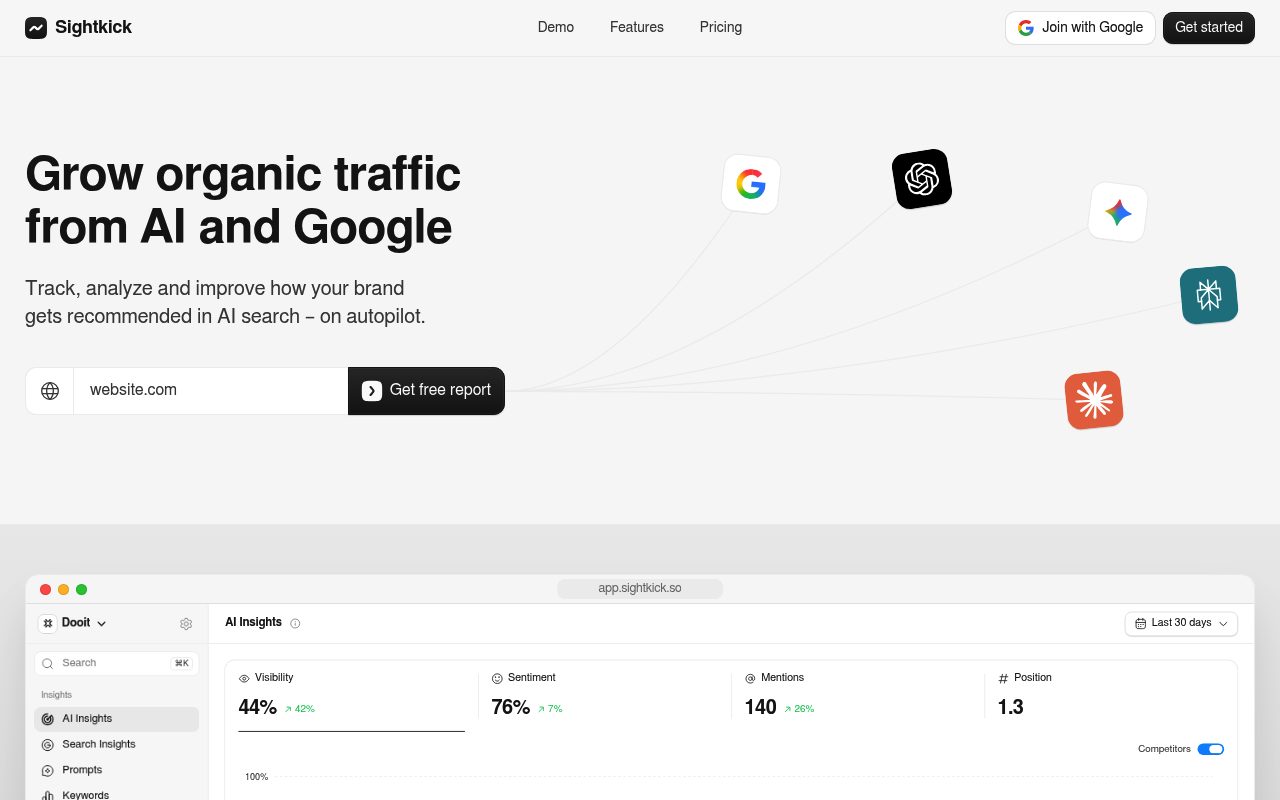
Screenshot: Sightkick homepage, October 2026.
Sightkick supports AI visibility reporting with daily prompt tracking, citation-source classification, scheduled article publishing, and backlink outreach. The platform tracks brand visibility, sentiment, mentions, and position across ChatGPT, Gemini, Google AI Overviews, and Google AI Mode. Its free report supplies a one-time benchmark; ongoing tracking supplies repeated observations.
Ownership disclosure: Sightkick is our product. The capabilities below are Sightkick’s stated features.
- Establish the benchmark. The free Brand Visibility Report shows visibility percentage, sentiment score, mention count, and average AI recommendation position relative to competitors.
- Track continuously. Sightkick runs every tracked prompt daily in three AI models; a fourth is an add-on. It records recommended brands for continuous competitive benchmarking.
- Inspect citation origins. Tracked sources are classified as UGC, Editorial, Yours, and Competitor. “Yours” identifies owned sources.
- Publish on schedule. The Articles engine researches, writes, scores, adds images, links, and schema, then publishes to a CMS daily without manual input.
- Run citation-focused outreach. The Backlinks engine finds pages AI already cites, verifies owner contact details, sends pitches and follow-ups, and confirms when backlinks go live.
Sightkick states a two-minute setup time and offers a three-day free trial. One plan costs $79 per month. Record the selected models and any fourth-model add-on in your report notes. These workflow features do not establish that a particular action caused a visibility change.
Frequently asked questions
An AI visibility report is only as interpretable as its sample and metric definitions. State which prompts, platforms, markets, and periods it covers. Keep mentions, citations, impressions, and business outcomes separate. The questions below address sample limits, cross-platform comparisons, and the findings a report can support.
What are the biggest limitations of measuring AI visibility accurately?
An AI visibility report cannot establish visibility outside the prompts, platforms, markets, and periods observed. Definitions also differ: Clarity citation activity is not Search Console impressions, and monthly data cannot prove daily movement. State coverage and missing observations beside the results.
How is an AI visibility report different from a traditional rank tracking report?
An AI visibility report measures brand presence inside generated answers and changes over time, rather than only traditional keyword rankings. Keyword positions do not supply answer-level mentions, sentiment, or citation evidence. Keep both reports when useful, but do not substitute rankings for captured answers.
Can one AI visibility report cover ChatGPT, Gemini, and Google AI Overviews consistently?
Yes. Use matching prompt definitions, collection windows, and scoring rules, then report each platform separately. Ahrefs Brand Radar includes all three and retains responses. Disclose the weighting and coverage of any combined score so platform-mix changes do not obscure results.
What are examples of key findings or insights an AI visibility report can reveal about a brand's presence?
An AI visibility report can reveal prompts where competitors appear but your brand does not, favorable or unfavorable brand descriptions, recommendation positions, and the pages cited as supporting evidence. Comparable reporting windows can also show gained or lost appearances. Each finding should link back to captured answers or source exports.
Create the prompt register first. Collect a baseline with complete answers and citation URLs. Use the unchanged register for the next reporting window.